
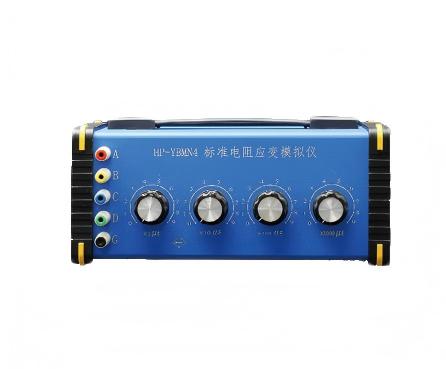
The HP-YBMN4 is a precision strain gauge simulator / Wheatstone bridge calibration box designed to verify and calibrate strain meters, strain amplifiers, and data acquisition strain channels. It uses an internal calibrated standard bridge and manual range switching to output controlled differential voltage (or equivalent microstrain) for reliable static calibration.
| High-Accuracy Output | Precision 0.05% with fine microstrain control for calibration-grade results. |
|---|---|
| Wide Simulation Range | Covers 0–10,000 με to match common structural and mechanical test needs. |
| Multiple Bridge Modes | Supports full / half / quarter bridge configurations for broad compatibility. |
| Stable & Low Drift | Drift as low as 0.5 με / 4h for long calibration sessions. |
| Simple Manual Operation | Knob + range switching makes setup fast without complex software. |
| System Verification Tool | Helps evaluate bridge resistance, component resistance influence, noise, and stability. |
Product Name: HP-YBMN4 Series Standard Resistance Strain Simulator
Type: Standard bridge / strain simulation instrument for strain measurement calibration
Core Function: Outputs calibrated differential signals representing 0–10,000 με to validate bridge balance, stability, noise, and measurement accuracy
Bridge Support: Full bridge, half bridge, quarter bridge (selectable via terminals)
HP-YBMN4 is built around an internal calibrated Wheatstone bridge (standard resistor network). By selecting ranges and adjusting front-panel knobs, users can generate repeatable simulated strain outputs (microstrain equivalents) to:
verify the strain system’s linearity and indication accuracy,
perform static calibration of high-precision strain instruments,
check bridge wiring correctness and system stability in lab or field setups.
Static calibration of strain indicators / strain meters
Calibration and verification of strain amplifiers and strain DAQ channels
QA checks for Wheatstone bridge measurement systems
Lab setup validation for structural testing, mechanical testing, and research instrumentation
Troubleshooting wiring and bridge configuration errors before running experiments
Compatible Inputs/Systems
Strain meters / strain indicators
Strain amplifiers / signal conditioners
Strain-capable DAQ systems (bridge input modules)
Bridge Compatibility
Full bridge / half bridge / quarter bridge simulation
Standard bridge resistance: 120 Ω
Terminal/Wiring
Front terminals A, B, C, D, E support common bridge wiring combinations (full/half/quarter)
| Item | Specification |
|---|---|
| Output (Simulated Strain) | 0–10,000 με |
| Output Accuracy | 0.05% ± 0.5 με |
| Drift | 0.5 με / 4h |
| Range/Steps | 4 ranges, knob-adjustable |
| Bridge Resistance | 120 Ω |
| Bridge Excitation (Input) | 1–10 VDC |
| Output Mode | Full bridge / Half bridge / 1/4 bridge |
| Operating Temperature | 0–40°C |
| Operating Humidity | 90% RH |
| Dimensions (L×W×H) | 300 × 150 × 130 mm |
| Weight | 1 kg |
Operation notes (practical):
Recommended warm-up time: ~20 minutes
Use a multimeter to confirm wiring continuity/correctness before calibration runs.
1) What is a strain gauge simulator used for?
It generates a stable, calibrated “simulated strain” output (differential bridge signal) to verify and calibrate strain meters, strain amplifiers, and DAQ strain inputs—especially for static calibration.
2) Can HP-YBMN4 work with quarter/half/full bridge setups?
Yes. It supports full bridge, half bridge, and quarter bridge output modes.
3) What bridge resistance does it simulate?
It uses a standard 120 Ω bridge network.
4) What excitation voltage can I use?
The bridge excitation range is 1–10 VDC.
5) How stable is the output over time?
Drift is specified at 0.5 με / 4 hours, which is suitable for long calibration sessions.
6) Do I need warm-up time before calibration?
Yes—allow about 20 minutes of warm-up for best stability and repeatability.