
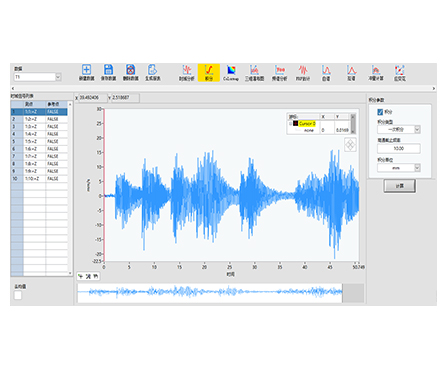
HP-STAP Series Micro-Integration Analysis Software is a signal analysis tool designed for first- and second-order integration processing on waveform data. It also provides flexible parameter configuration, including high-pass filter and nested frequency settings, to help engineers extract cleaner, more meaningful results from time-domain signals.
| Integration Accuracy | Perform 1st/2nd integration to transform signals for analysis tasks |
|---|---|
| Noise Control | Use high-pass filter settings to reduce drift and unwanted low-frequency components |
| Parameter Flexibility | Adjust processing parameters (including nested frequency-related settings) for different test scenarios |
| Faster Diagnosis | Turn raw waveforms into actionable outputs with a streamlined analysis workflow |
| Clear Visualization | Work directly on waveform plots with cursor-based inspection for quick validation |
Product Name: HP-STAP Series Micro-Integration Analysis Software
Category: Signal processing & waveform analysis software
Core Functions:
First-order integration (single integration)
Second-order integration (double integration)
Parameter setup (e.g., high-pass filtering, nested frequency settings)
Typical Users: Test engineers, vibration/condition monitoring teams, R&D labs, QA teams
HP-STAP is built for workflows where raw time-domain signals must be converted through integration to support deeper diagnostics and engineering decisions. With a waveform-focused interface (plot + cursor/marker tools), users can visualize signals clearly, apply integration processing, and fine-tune filtering parameters to reduce low-frequency drift and improve interpretability.
Waveform integration analysis for engineering tests
Signal drift reduction and baseline stabilization with high-pass filtering
Time-domain signal post-processing for lab testing and field diagnostics
Research, troubleshooting, and validation workflows where integrated results are required
Input Type: Time-domain waveform / signal data (integration-ready signals)
Sensor Compatibility: Works with signals captured from compatible measurement setups (sensor type depends on your acquisition hardware and signal source)
Best Practice: Ensure your input signal is properly scaled and calibrated before applying 1st/2nd integration, and use high-pass filtering when low-frequency drift is present.
(Based on the provided product info in the image; exact options may vary by version.)
Integration Mode:
First-order (single integration)
Second-order (double integration)
Filter / Processing Parameters:
High-pass filter configuration
Nested frequency-related settings (configurable processing parameters)
Analysis Workspace:
Waveform plotting area with inspection tools (e.g., cursor/marker-style review)
Parameter panel for quick adjustments
1) What does first-order vs. second-order integration mean?
First-order integration applies integration once to the signal; second-order applies it twice. The choice depends on what output you need for your analysis workflow.
2) Why do I need a high-pass filter when integrating signals?
Integration can amplify low-frequency drift and baseline offset. High-pass filtering helps reduce these effects and stabilizes results.
3) Can I adjust integration and filtering parameters for different tests?
Yes. HP-STAP supports parameter setup for integration processing, including high-pass filter and related frequency settings.
4) What kinds of signals can I analyze?
HP-STAP is designed for time-domain waveform signals suitable for integration. Your sensor type depends on your measurement system and signal source.
5) How do I choose between 1st and 2nd integration?
Choose based on the analysis goal and the meaning of the derived output in your test standard or engineering requirement.
6) Is HP-STAP suitable for lab and field use?
It can be used in both contexts as long as you have waveform data available and a defined integration analysis need.